

Case studies / Hilti for Business
Hilti for Business
A conceptual B2B digital experience connecting tools, fleets, people, jobsites, maintenance, services and data to help businesses operate with greater visibility, continuity and control.
This is an independent, unaffiliated conceptual case study developed by Pibeca Solutions. It was not commissioned, endorsed or produced in collaboration with Hilti, its subsidiaries, teams or partners. All trademarks, product names, images and references remain the property of their respective owners. Its purpose is to explore how the Hilti digital experience for business customers could evolve through B2B strategy, product architecture, UX, connected services, asset management and stronger integration between products, software and day-to-day operations.
Strategic and conceptual direction: Beatriz Ávila.
We were not trying to redesign Hilti. We wanted to design a dedicated experience for businesses that do more than buy tools: they need to keep equipment, people and jobsites moving.
Why this project exists
Hilti already offers professional customers a broad ecosystem of tools, consumables, software, repairs, maintenance, fleet management, asset tracking, engineering, support and related services.
The brand has moved far beyond one-off product sales.
For a business customer, however, the relationship with Hilti does not begin and end with choosing a tool. It also involves contracts, assets, locations, responsible users, inspections, incidents, documentation, repairs and decisions about how the fleet is deployed.
This project therefore does not begin with the assumption that Hilti needs a new overall digital identity, or that its ecommerce platform and existing services should be replaced.
It begins with a different question: what should a digital experience look like when it is designed specifically for businesses that manage tools, equipment and services as part of an ongoing operation?
The conceptual opportunity is to create a clear B2B vertical within the wider Hilti ecosystem.
A space that does not force professional customers to translate a complex offer into operational decisions on their own.
Not simply finding a tool, but understanding what the business needs, how that tool fits into its fleet, where it should be, who is using it, when it requires maintenance and what could happen if it is no longer available.
The challenge
The challenge was not to redesign the whole Hilti website. Nor was it to create a standalone application intended to replace ON!Track, Tool Fleet Management or the digital services already available.
The challenge was to design a dedicated business experience capable of organising and connecting:
- •Professional tools and systems
- •Consumables and accessories
- •Software and digital services
- •Tool fleet management
- •Asset tracking and management
- •Repair and maintenance
- •Engineering and technical support
- •Training and safety
- •Orders, contracts and documentation
- •People, teams and permissions
- •Jobsites, warehouses and locations
- •Utilisation and availability data
- •Integration with customer systems
Each of these areas answers a genuine business need. The problem arises when customers have to move through them as separate pieces and reconstruct the relationship between purchasing, operations, maintenance and continuity for themselves.
The concept needed to provide a coherent B2B entry point without flattening the technical depth of the Hilti ecosystem.
Not fewer capabilities. Better guidance, better access and stronger continuity between processes.
Brand interpretation
Hilti for Business should not operate as a corporate version of the general product catalogue.
A business does not buy in the same way as an individual looking for a specific tool.
Before acquiring equipment, it needs to answer broader questions:
- •What does the jobsite require?
- •What tools do we already own?
- •Where are they?
- •How much of the fleet is currently available?
- •Which assets are underused?
- •Which contracts are still active?
- •Which inspections are approaching?
- •Which incident could affect the schedule?
- •Should we buy, expand a service or reorganise the fleet?
- •Who needs to act?
The concept therefore sits at the intersection of several tensions:
- •Physical product and digital service
- •One-off purchase and ongoing relationship
- •Individual tool and fleet management
- •Technical catalogue and business need
- •Industrial durability and technological sophistication
- •Global presence and local operations
- •Data availability and decision-making ability
- •Ecommerce and consultative service
- •Self-service and specialist support
The experience did not need to look more technological through dramatic dashboards or abstract claims about artificial intelligence.
It needed to demonstrate that technology can help a business reduce friction, uncertainty, downtime and avoidable costs.
The product remains essential. The platform extends its value.
The strategic decision
The proposal is built around one central idea: Hilti for Business would not be a larger online store. It would be a digital layer through which businesses could better understand, contract and operate the professional Hilti ecosystem.
The experience is organised around four moments.
Discover
Help businesses find the right solution based on their sector, size, operating model, type of project or immediate need. Customers could still go directly to the catalogue, but they could also begin with situations that reflect the way they actually work: equipping a new jobsite, managing a fleet, coordinating tools across several locations, reducing downtime, improving traceability, repairing or replacing equipment, or finding the right solution for a particular application.
Plan
Allow the business to define its context before purchasing a product or contracting a service. The experience could connect information such as company type, number of employees and jobsites, locations, existing tools, anticipated requirements, relevant services, acquisition model, support needs and potential integrations with other systems. The aim would not be to create a rigid configurator. It would be to help each customer build a clear, understandable solution suited to the reality of its operation.
Operate
Provide a private environment in which customers can view and manage their relationship with Hilti through the logic of their own operation. From this space, the business could access and manage jobsites, locations, people, tools, assets, contracts, orders, inspections, repairs, documentation, alerts and support requests while preserving context across related processes.
Improve
Turn available data into signals that support better decisions. The goal would not be to display more information, but to identify underused assets, unlocated equipment, availability risks, upcoming inspections, delayed repairs, tools that could be reassigned, avoidable costs and future requirements.
Ecommerce would remain central to the relationship, but the relationship would no longer end at the transaction.
Methodology, assumptions and limitations
This case study is based exclusively on publicly accessible information about Hilti’s digital presence, product catalogue, professional services, fleet-management models, asset-tracking solutions, repair processes and publicly available documentation relating to its digital products.
The proposal does not include access to:
- •Internal analytics
- •User research conducted by Hilti
- •Technology architecture
- •Product roadmap
- •Usage data
- •Live telemetry
- •Internal commercial processes
- •Market-specific contract models
- •Implementation costs
- •Active customer integrations
- •Regulatory or security constraints
- •Internal support processes
- •Strategic priorities
- •Needs expressed directly by Hilti or its customers
It should therefore be read as a conceptual hypothesis.
It does not assume that Hilti’s current platforms are technically disconnected or that the company lacks a B2B strategy.
A public-facing experience may be shaped by commercial, technological, regulatory or regional decisions that are not visible from the outside.
The purpose of the exercise is to explore how a dedicated business entry point could guide customers, connect existing capabilities and create continuity between processes that already exist.
How success would be measured
As this is a conceptual exercise, any performance indicator would need to be validated against internal data, real business objectives and a baseline agreed with the responsible teams.
Even so, the experience could be evaluated across five dimensions.
Discovery
At this stage, relevant measures could include the time required to find an appropriate solution, the use of need-based journeys, navigation by sector or business size, access to the catalogue from a professional context and the quality of commercially relevant enquiries.
Conversion
Conversion could be assessed through the configuration of complete solutions, requests for specialist advice, combined product-and-service contracting, adoption of management tools and differences in conversion between business segments.
Operations
Operational performance could be measured through the time required to locate an asset, the proportion of tools assigned correctly, inventory quality, incidents resolved and the number of processes completed through the digital workspace.
Continuity
It would also be important to analyse equipment downtime, repairs initiated through the platform, inspection compliance, the availability of critical tools, replacement management and reductions in preventable disruption.
Adoption
Adoption could be measured through active users, jobsites and locations managed, usage frequency, role-based adoption, use of mobile actions, engagement with recommendations and the quality and freshness of operational data.
Success would not depend only on traffic, sales or the number of registered assets. It would depend on the platform’s ability to reduce uncertainty, wasted time and operational friction.
From hypothesis to product experience
To make the proposal tangible, the case study develops a conceptual sequence of screens covering the main B2B journey.
The intention is not to redesign every Hilti product or service. It is to demonstrate how a dedicated business experience could connect discovery, operations and ongoing support.
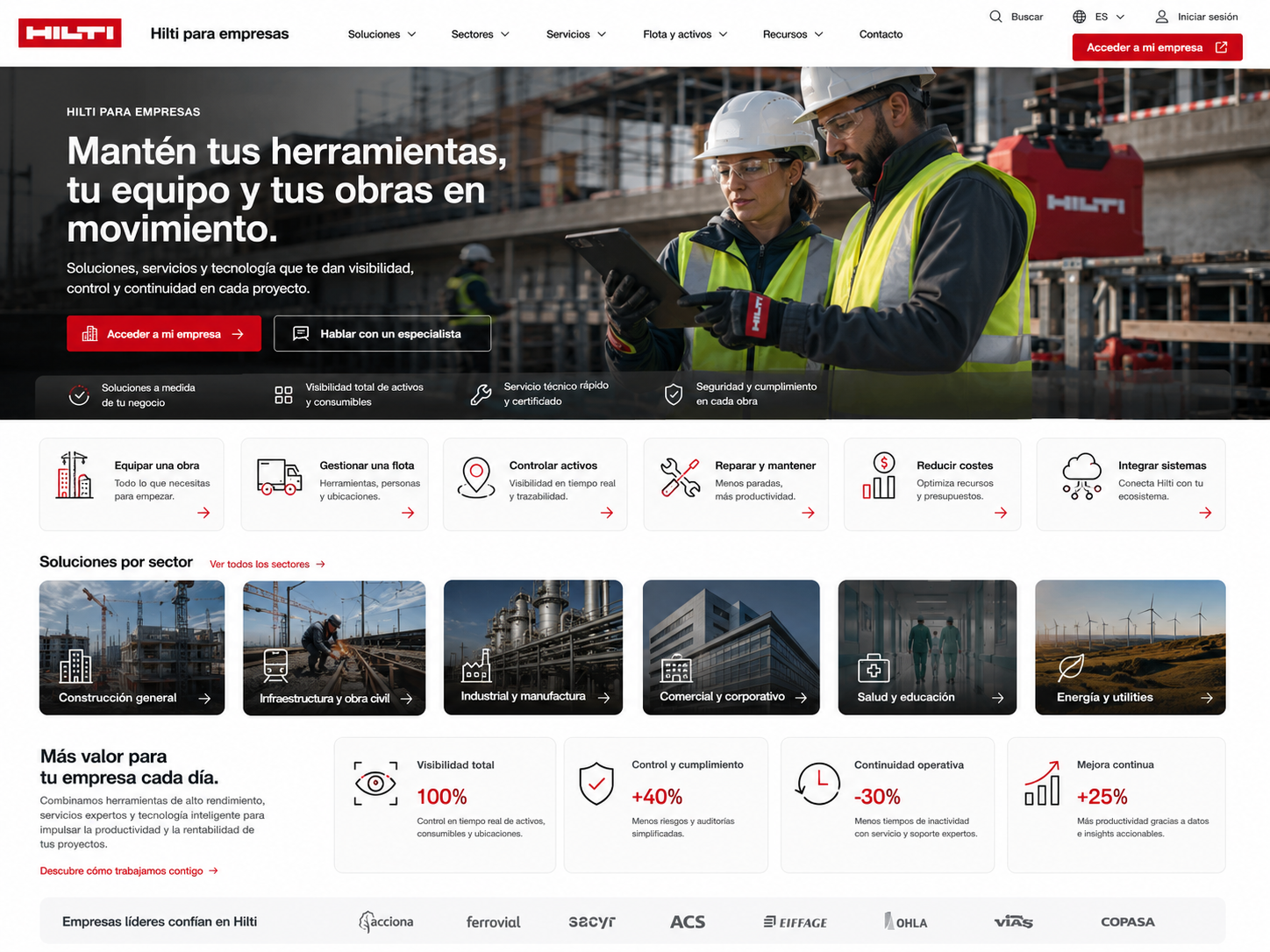
Screen 01 · Hilti for Business home
The business customer enters through a dedicated proposition rather than a generic product catalogue. The page introduces routes based on real needs: equipping a jobsite, managing a fleet, controlling assets, reducing downtime, repairing equipment, lowering costs or connecting systems. Sector-based navigation provides an additional layer of context.
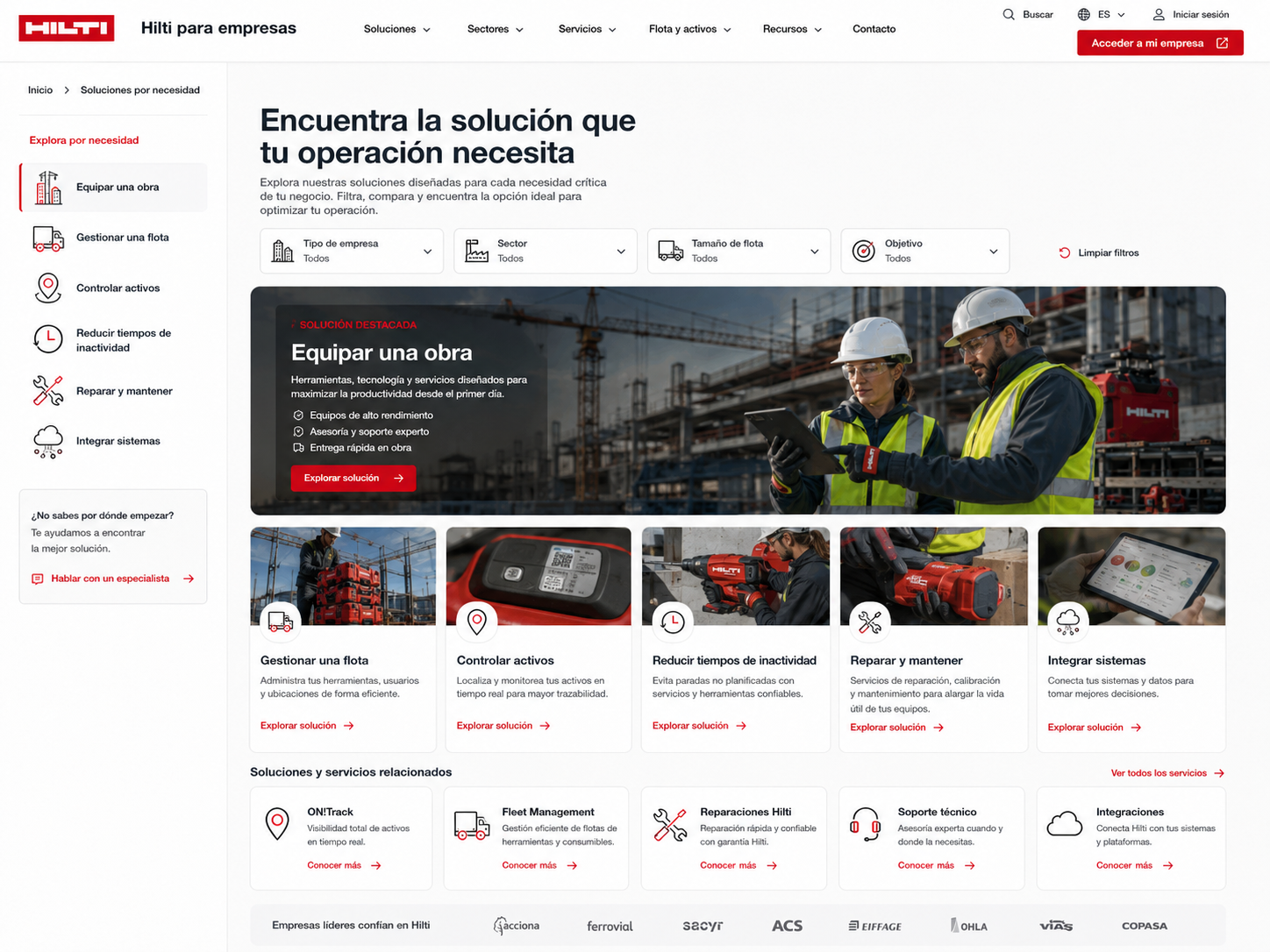
Screen 02 · Solutions by business need
The user explores solutions through a combination of company type, sector, fleet size and operational objective. Products, software, services and specialist support are brought together around a business problem rather than presented as unrelated categories.
Screen 03 · Business workspace
Once signed in, the customer sees an operational overview of active jobsites, tools in use, available assets, ongoing repairs, upcoming inspections and outstanding actions. The purpose of the dashboard is not to display as many metrics as possible. It is to show what requires attention.
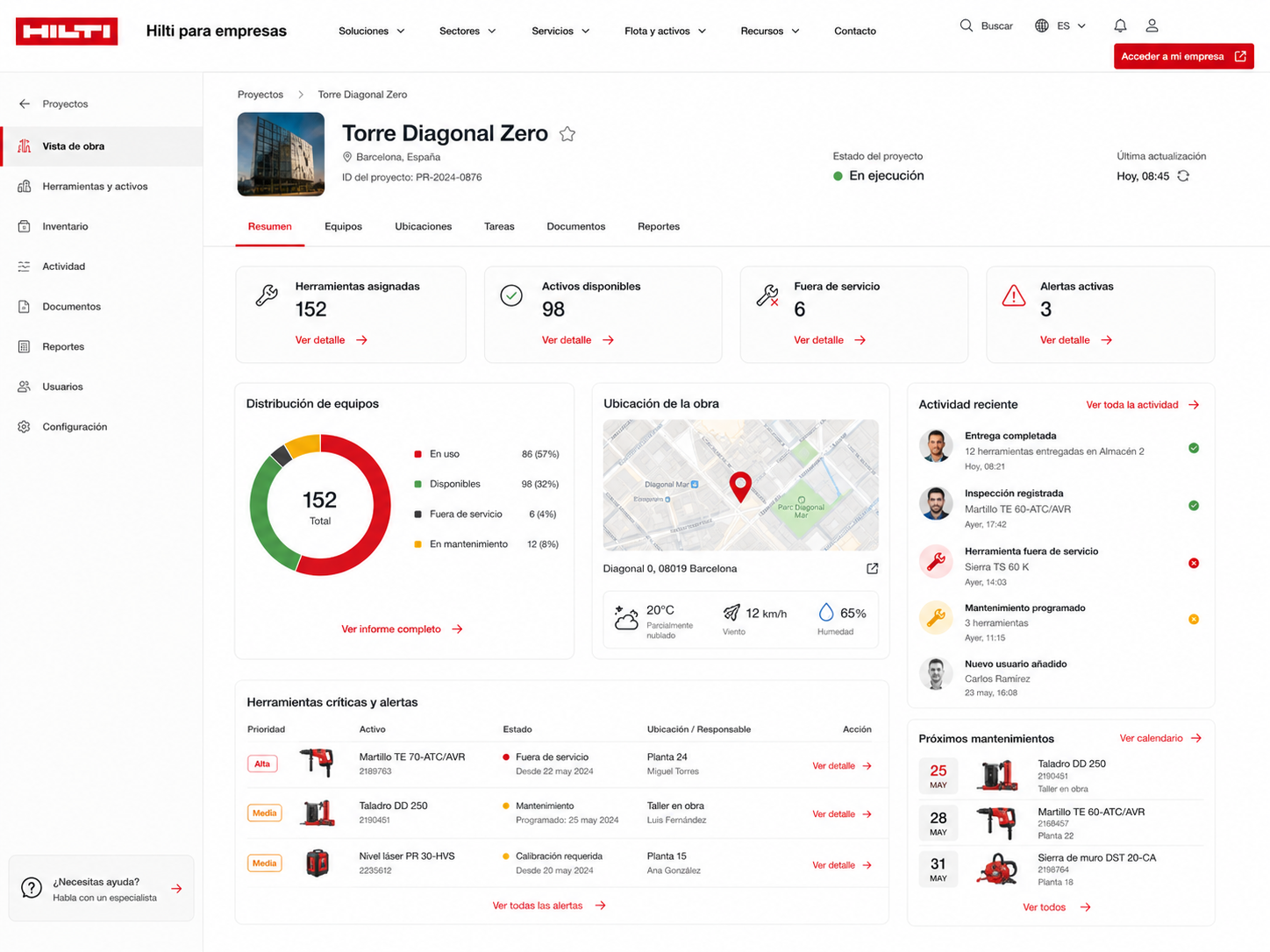
Screen 04 · Jobsite view
Each jobsite becomes an operational unit connecting assigned tools, available assets, incidents, maintenance, responsible users and recent activity. The customer can understand what is available, what is missing and what may affect continuity.
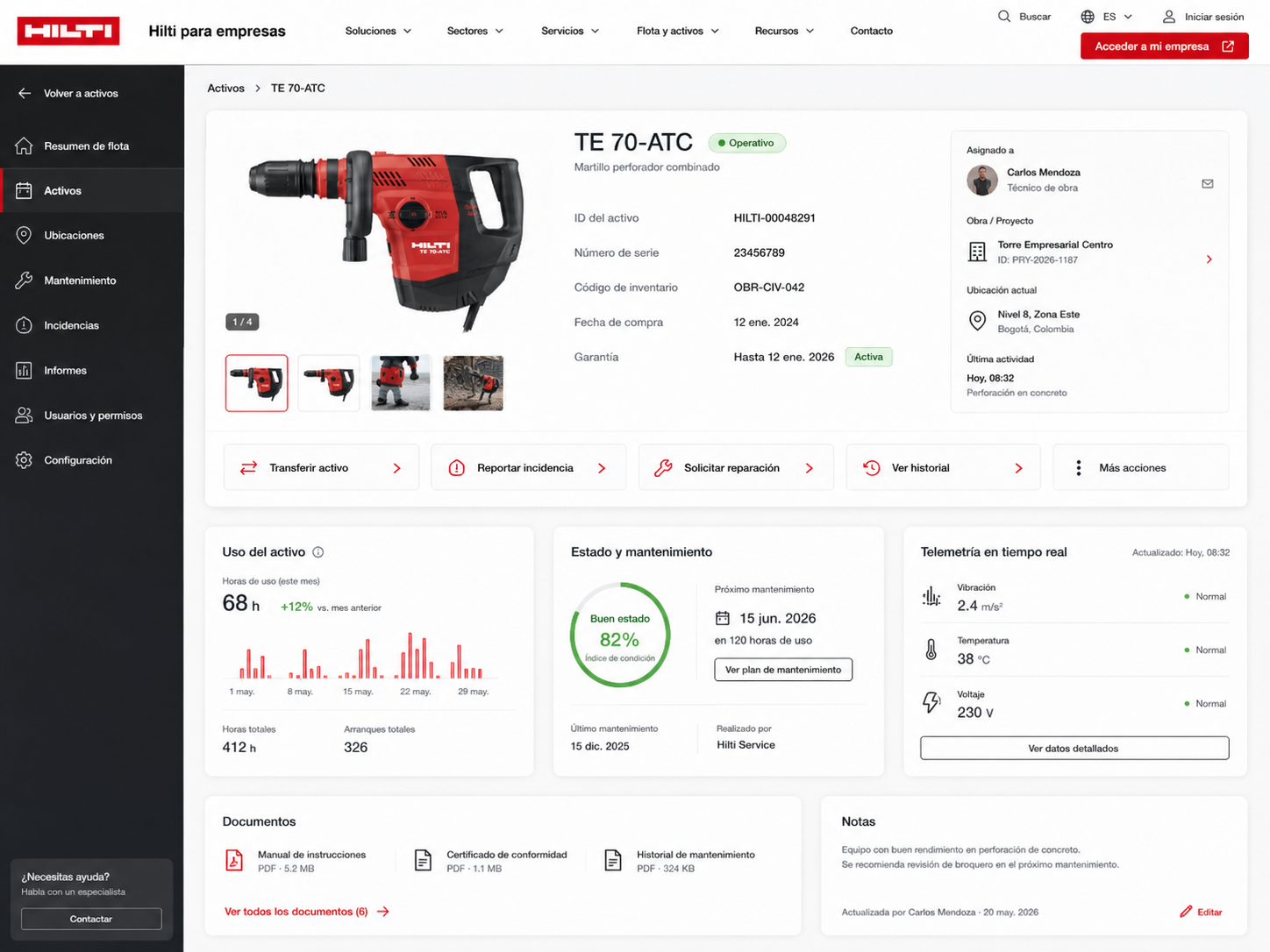
Screen 05 · Asset record
An individual tool is presented not only as a product, but as a business asset with an assigned user, location, jobsite, usage history, maintenance status, documentation and available actions.
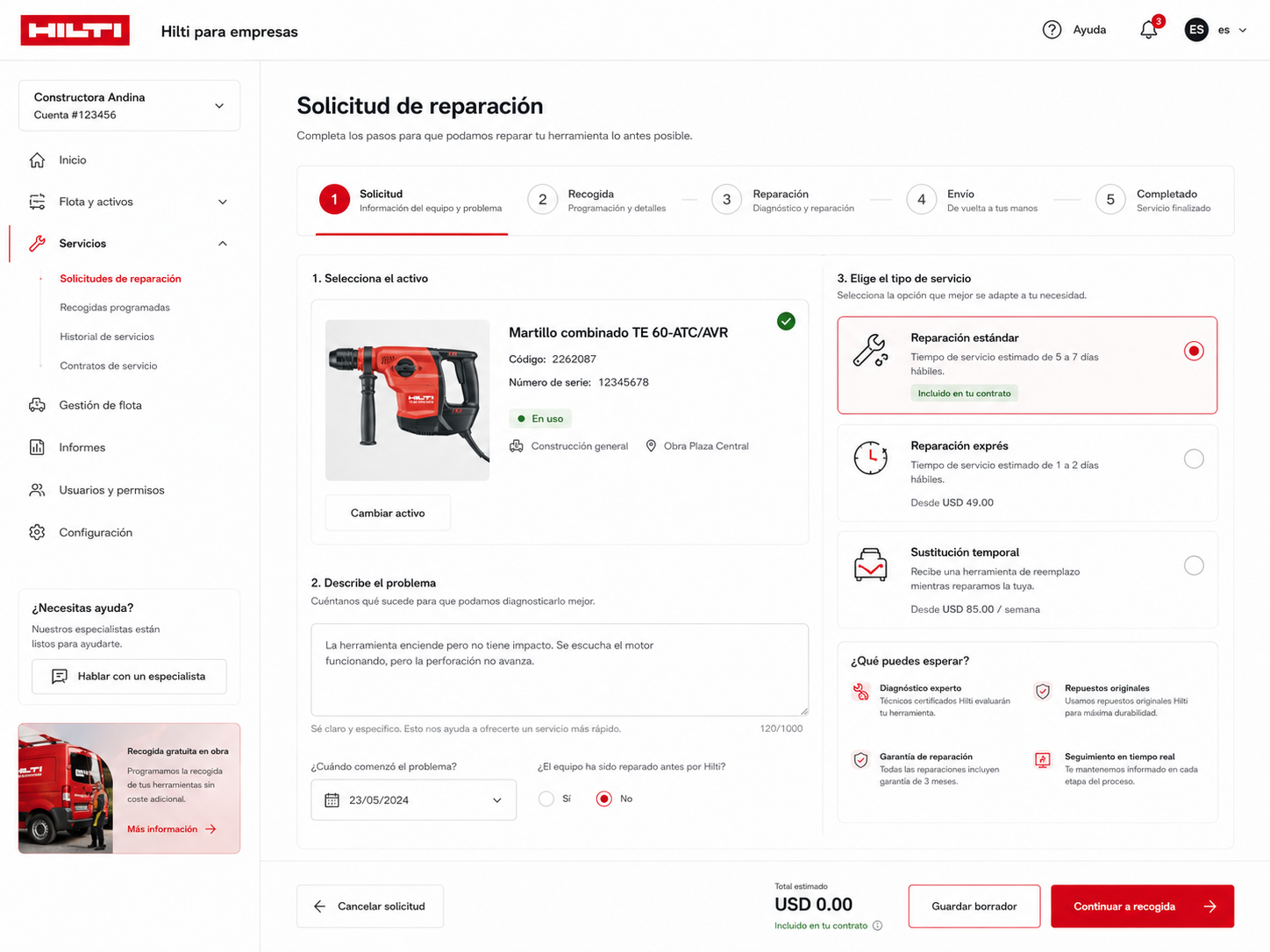
Screen 06 · Repair request
The repair flow connects the technical issue with its operational context. The customer can select the affected asset, describe the problem, choose the appropriate service level and understand estimated times, contractual coverage and possible temporary replacement.
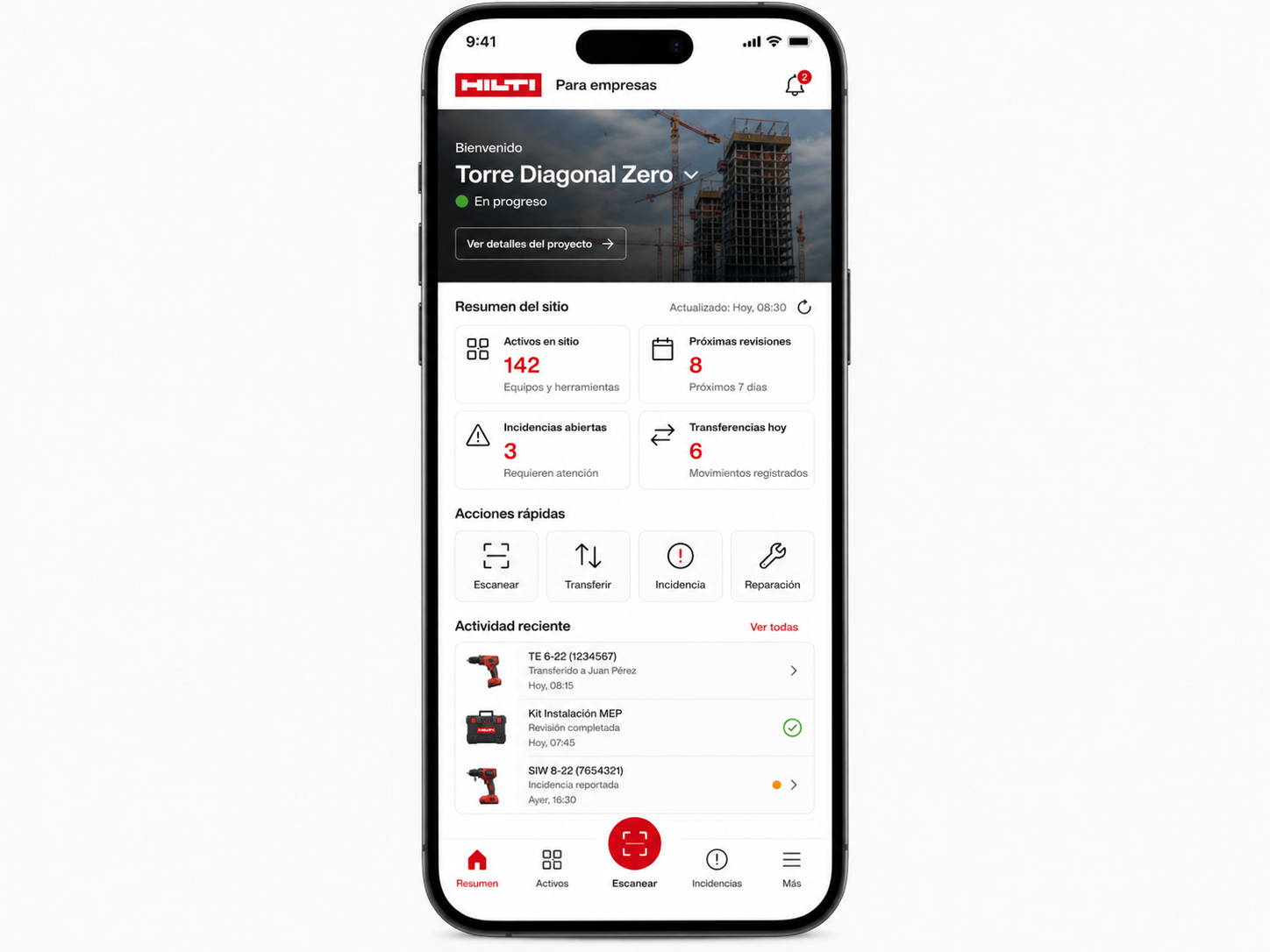
Screen 07 · Mobile field experience
The mobile experience supports fast actions in jobsites, warehouses and vehicles: scanning, checking assignments, transferring assets, reporting incidents and requesting repairs.
This sequence makes the central thesis visible: the value of the platform does not lie in placing every Hilti capability on one screen. It lies in preserving context as the customer moves from need to product, from product to asset, and from asset to operation.
What would need to be validated before implementation
Before a concept of this kind could become a real product, it would need to be validated with Hilti and with businesses of different sizes and levels of operational maturity.
The experience of a small installation company cannot be designed according to the same logic as that of a major construction group managing multiple jobsites, warehouses and hundreds of assets.
Validation would need to cover:
- •The needs of each customer segment
- •Differences between small, medium-sized and large businesses
- •Roles, permissions and responsibilities
- •Purchasing and contracting processes
- •Fleet Management models
- •Integration with ON!Track
- •Data availability and quality
- •Operation in low-connectivity environments
- •Asset scanning and identification
- •Repair and replacement processes
- •Operational differences between markets
- •Security and privacy
- •Integration with third-party systems
- •Data migration
- •Training and support
- •Internal adoption
- •Operational capacity to maintain the platform
This exercise is not intended to replace that process. Its purpose is to make visible the questions that should guide it.
THE CONCEPTUAL DIRECTION
01 · Visual direction
The visual system was built around a technical, robust and operational aesthetic. We did not want Hilti for Business to become an advertising campaign dominated by red backgrounds, isolated product renders and commercial headlines, nor did we want to create a futuristic interface detached from the reality of a jobsite, warehouse or distributed fleet.
The experience needed to convey:
- •Precision
- •Durability
- •Clarity
- •Control
- •Reliability
- •Operational capability
These colours provide space for complex information without making the interface feel heavy. Light surfaces allow modules, states and actions to be separated clearly.
Graphite
Used for navigation, structure, contrast and areas with greater functional density.
Hilti red
Used as a signal for brand, action, selection and alerts. Red guides attention and establishes priority. It does not dominate every surface.
Material tones
Concrete, steel, timber, dust and jobsite surfaces connect the interface to the physical environment without turning the design into a literal simulation of construction.
Operational photography
Photography shows teams at work, site managers, tools in context, warehouses, vehicles, servicing, deliveries and coordination. The product is not the only protagonist. The wider operation that the product helps sustain is equally important.
Functional iconography
Icons support actions, states and navigation routes. They are not used as decoration, but as visual cues that help users recognise categories, needs and processes quickly.
Sans-serif typography
A clear, robust typeface capable of performing consistently across headlines, forms, tables, filters, status labels and information-dense dashboards.
The overall experience was intended to feel like a combination of:
- •Industrial platform
- •Working tool
- •Connected technical service
- •Operations system
- •Highly reliable global brand
02 · The home concept
The home page is not intended to become a replacement for the main Hilti website, it is designed as the dedicated entry point to Hilti for Business. Its role is to help visitors recognise themselves as professional customers and choose the right route.
The hero introduces a clear promise: keep your tools, your team and your jobsites moving.
The photography brings together people, technology and the jobsite environment.
The visual proposition is not based solely on isolated tools. It shows work, coordination and decision-making in context.
From there, customers can enter through a specific need:
- •Equip a jobsite
- •Manage a fleet
- •Track tools and assets
- •Reduce downtime
- •Repair and maintain equipment
- •Reduce costs
- •Connect systems
- •Speak to a specialist
The home page also introduces solutions by sector:
- •General construction
- •Infrastructure and civil engineering
- •Industry and manufacturing
- •Commercial and corporate environments
- •Healthcare and education
- •Energy and utilities
The concept does not force every customer through the same journey.
It helps each business find the route that matches its reality.
03 · A B2B vertical, not a separate website
Hilti for Business is not conceived as an independent brand or as a website disconnected from Hilti. It operates as a B2B vertical within the main ecosystem. It shares:
- •Identity
- •Catalogue
- •Customer account
- •Products
- •Services
- •Support
- •Documentation
At the same time, it introduces an architecture designed specifically for business needs. A customer can move from the general catalogue to a professional solution, and from a specific tool to its operational context.
The vertical does not duplicate the ecosystem. It organises and connects it.
04 · Solutions by business type
One of the main decisions was to recognise that not every business requires the same depth of functionality.
Sole traders and small teams
They need to find products, access repairs, review orders and maintain a straightforward overview of their tools.
Installation and specialist contractors
They need to coordinate mobile teams, manage assignments, reduce losses and access documentation quickly.
Mid-sized construction companies
They need to connect multiple jobsites, responsible users, locations, assets, contracts and maintenance processes.
Large organisations
They need aggregated visibility, permissions, integrations, governance, reporting and the ability to operate across multiple units or markets.
The experience should scale with customer complexity. It should not force a small business into an oversized system or constrain a large organisation with an interface that is too simplistic.
05 · Solutions by business need
Navigation does not begin only with product categories, it also allows customers to begin with real operational situations:
- •I need to equip a new jobsite
- •I want to manage a fleet
- •I need to track tools and assets
- •I want to reduce downtime
- •I need to repair and maintain equipment
- •I want to connect our systems
- •I need to analyse utilisation and cost
- •I need technical advice
The experience introduces filters for business type, sector, fleet size and objective. This reduces the effort required to navigate the ecosystem and makes it possible to surface more relevant solutions from the outset. Each need connects products, services, software and support.
Customers should not have to work out for themselves which part of the ecosystem can solve each problem. The platform creates that relationship.
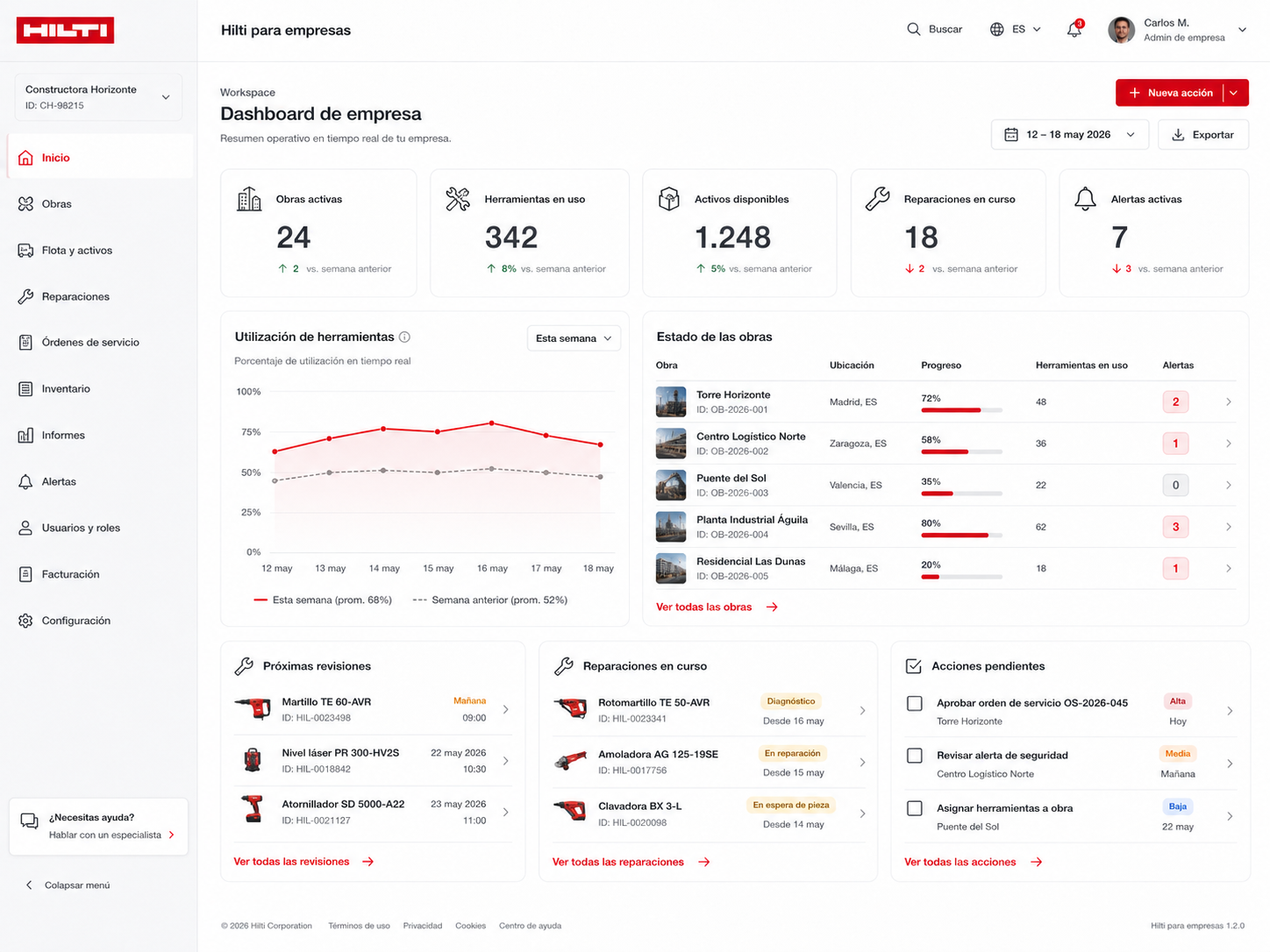
06 · The business workspace
- •Active jobsites
- •Tools in use
- •Available assets
- •Repairs in progress
- •Alerts
- •Upcoming inspections
- •Outstanding actions
- •Overall operational status
- •A jobsite
- •A location
- •A person
- •A tool
- •A contract
- •A repair
- •A service order
- •An order
07 · The jobsite as an operational unit
A jobsite connects tools, people, locations, schedules and risks. For that reason, it occupies a central place within the experience. The jobsite view brings together:
- •Assigned tools
- •Available assets
- •Equipment out of service
- •Active alerts
- •Equipment distribution
- •Location
- •Recent activity
- •Upcoming maintenance
- •Critical tools
- •Documentation
- •Responsible users
This enables the business to answer practical questions:
- •Is the required equipment ready?
- •Which tool has not yet arrived?
- •Which asset is assigned to another location?
- •Is an upcoming inspection likely to affect the schedule?
- •Is an alternative available?
- •Who needs to take the next action?
The concept is not intended to become a complete construction project-management platform. It focuses on the part that tools, services and availability play in keeping a jobsite operational.
08 · The tool as a business asset
Within Hilti for Business, a tool is not presented only as a product. It also operates as an asset with context. Its record can include:
- •Model
- •Serial number
- •Inventory code
- •Status
- •Location
- •Responsible user
- •Assigned jobsite
- •Warranty
- •History
- •Utilisation
- •Maintenance
- •Telemetry
- •Repairs
- •Documentation
- •Notes
- •Available actions
A customer can purchase a tool, but can also transfer it, report an incident, request a repair, view its history or check its technical condition. Product and operation no longer exist in separate digital spaces.
09 · Maintenance as part of operational continuity
Repair is not treated as an isolated journey that begins only once something has failed. It is integrated into the operation.
The repair request guides the customer from asset selection through collection, diagnosis, repair, return shipping and completion.
Throughout the process, the business can understand:
- •Which tool is affected
- •Which jobsite it belongs to
- •Who is using it
- •What problem it has
- •Which service option is available
- •What timescale is expected
- •Whether a temporary replacement is available
- •Which part of the service is covered by contract
- •What stage the repair has reached
Maintenance is no longer only a technical proces as it becomes an operational decision.
The goal is not simply to repair sooner, but to protect the business’s capacity to work while the issue is being resolved.
10 · Data that supports decisions
The concept avoids dashboards filled with metrics that lack context. Data should answer useful questions:
- •Which tools are actually being used?
- •Which equipment remains inactive?
- •Where do the greatest losses or delays occur?
- •Which jobsite carries the highest risk?
- •Which assets could be reassigned?
- •Which inspections should be prioritised?
- •Which combination of purchase and service is most appropriate?
- •Which processes create the most friction?
Every recommendation should explain:
- •What is happening
- •Why it matters
- •What impact it may have
- •What action is available
The purpose is not to add artificial intelligence as a commercial claim, but to turn operational information into understandable decisions.
11 · Mobile experience
The mobile experience responds to the reality of jobsites, warehouses and teams on the move. It is not a reduced desktop interface. It supports quick actions such as:
- •Scan a tool
- •Check its assignment
- •Transfer an asset
- •Confirm a delivery
- •Report an incident
- •Request a repair
- •Access documentation
- •Check an inspection
- •Record a return
The interface prioritises immediate comprehension, clear actions and as few steps as possible. The mobile home places the user within the active jobsite and presents:
- •Assets on site
- •Upcoming inspections
- •Open incidents
- •Recent transfers
- •Team activity
It should also support low-connectivity environments and processes awaiting synchronisation. Designing for the jobsite means designing for real conditions.
12 · Ecosystem integration
Hilti for Business is not conceived as an isolated system. It operates as a connected layer across:
- •Customer account
- •Catalogue and ecommerce
- •Contract management
- •Tool Fleet Management
- •ON!Track
- •Repairs
- •Service orders
- •Logistics
- •Support
- •Documentation
- •Technical software
- •Identity and permissions
- •Connected-tool data
- •Internal Hilti systems
- •Customer platforms where integration is viable
A unified experience does not require every capability to become part of one monolithic system. It requires customers to move between related processes without losing context.
13 · Adoption and operations
A B2B platform can be well designed and still fail to create value if teams do not incorporate it into their daily work.
The concept therefore includes:
- •Initial configuration
- •Asset import
- •Data cleansing and standardisation
- •Location setup
- •User onboarding
- •Role assignment
- •Integration with existing systems
- •Training
- •Support
- •Adoption monitoring
It would also be necessary to define who maintains each data point, how errors are corrected and what happens when a tool changes user, location or status.
The objective would not simply be to launch Hilti for Business. It would be to keep the experience useful, reliable and current.
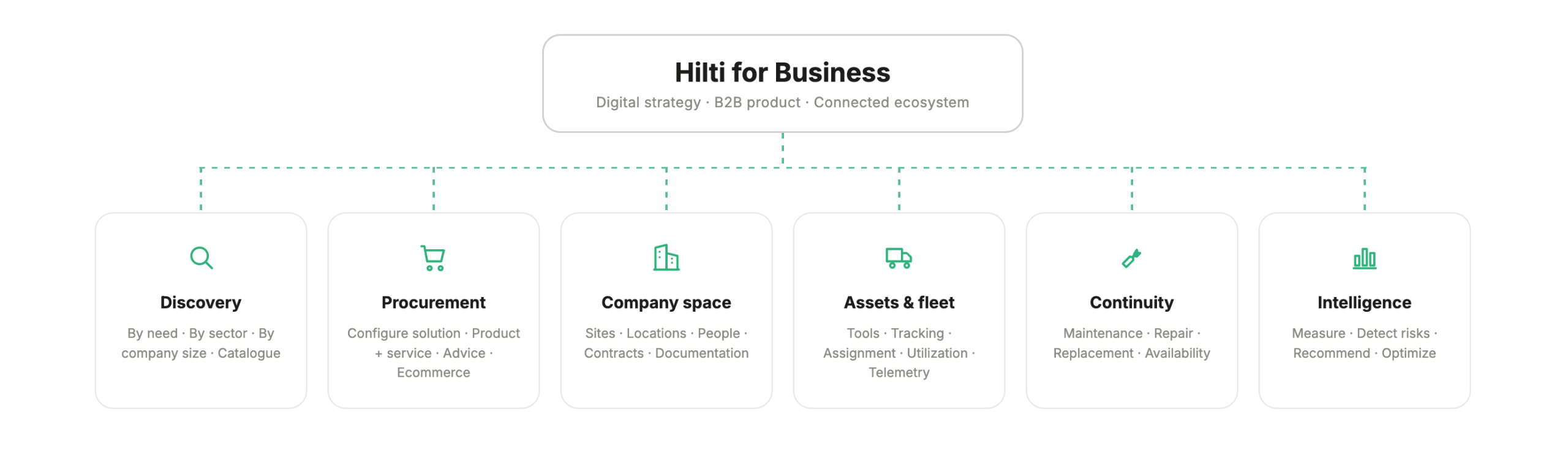
Ecosystem architecture
A B2B experience connecting business need, solution discovery, acquisition, operations, maintenance and continuous improvement.
What changes with this proposal?
- •
The main experience is organised around the wider Hilti ecosystemProducts, services, support and professional solutions coexist within a broad brand capable of meeting many different needs. The proposition is strong, but business customers may still need to interpret which journey best fits their operation.
- •
Professional customers have access to specialised capabilitiesThey can purchase tools, manage assets, review contracts, request repairs and access digital services. Each capability addresses a specific need, although the relationship between them may not always be presented as one continuous experience.
- •
The tool is the primary visible unitThe commercial experience often begins with the product, its application, technical specifications, accessories and associated services.
- •
Each process serves a specific objectivePurchasing, repairs, asset management, support and contracting may appear as separate journeys. The customer has to reconstruct the context when moving from one need to another.
- •
The business adapts the ecosystem to its own operationThe customer internally connects tools, jobsites, locations, responsible users, contracts and requirements to understand how each element affects continuity of work.
- •
Data supports asset and service managementThe information available helps improve traceability and control, although it may still require interpretation before it can support specific operational decisions.
- •
A dedicated business verticalHilti for Business organises the B2B proposition around professional needs, customer profiles and operational realities without replacing the wider Hilti ecosystem.
- •
Customers understand how product, service and software work togetherThe platform shows how the different parts of the ecosystem connect and which combination is most appropriate for each type of business, jobsite or operational need.
- •
Jobsites and availability become more prominentThe tool remains central, but it is placed within an operational context: where it is, who uses it, which jobsite it belongs to, what condition it is in and what may happen if it becomes unavailable.
- •
Processes preserve contextThe customer can move from an alert to an asset, from an asset to a jobsite and from an incident to a repair without rebuilding the relevant information at each step.
- •
The business can understand its operation within the Hilti ecosystemPeople, locations, tools, contracts, orders, repairs and services are presented as connected parts of the same operational relationship.
- •
Data supports better decisionsThe platform does more than display information. It identifies risks, underused assets, upcoming inspections, delayed repairs and possible actions to improve continuity and fleet utilisation.
Key decisions
Pibeca's contribution
Does your business sell products, or support operations?
We design B2B digital ecosystems that connect product, service, technology and data. Platforms that do more than make purchasing easier: they help businesses and teams work better.